2025-03-05 13:02:47 +08:00
|
|
|
|
<h1 align="center">语析 - 基于大模型的知识库与知识图谱问答系统</h1>
|
2024-11-15 00:15:15 +08:00
|
|
|
|
<div align="center">
|
|
|
|
|
|
|
2024-11-23 11:35:01 +08:00
|
|
|
|

|
2025-02-28 14:39:03 +08:00
|
|
|
|

|
2024-11-15 00:15:15 +08:00
|
|
|
|

|
|
|
|
|
|

|
2024-11-23 11:35:01 +08:00
|
|
|
|

|
2025-02-20 12:14:39 +08:00
|
|
|
|

|
2024-11-15 00:15:15 +08:00
|
|
|
|
|
|
|
|
|
|
</div>
|
2024-09-26 10:57:20 +08:00
|
|
|
|
|
2025-02-28 14:39:03 +08:00
|
|
|
|
## 📝 项目概述
|
2025-02-20 12:14:39 +08:00
|
|
|
|
|
2025-02-28 14:39:03 +08:00
|
|
|
|
语析是一个强大的问答平台,结合了大模型 RAG 知识库与知识图谱技术,基于 Llamaindex + VueJS + FastAPI + Neo4j 构建。
|
2025-02-20 12:14:39 +08:00
|
|
|
|
|
2025-02-28 14:39:03 +08:00
|
|
|
|
**核心特点:**
|
2025-02-24 19:41:44 +08:00
|
|
|
|
|
2025-05-25 21:55:02 +08:00
|
|
|
|
- 🤖 多模型支持:适配 OpenAI、各大国内主流大模型平台,以及本地 vllm、ollama 部署,只需配置对应服务平台的 `API_KEY` 即可使用。
|
|
|
|
|
|
- 📚 灵活知识库:支持 PDF、TXT、MD、Docx 等多种格式文档,支持通过 URL 添加文件,支持联网搜索,辅助回答最新信息。
|
|
|
|
|
|
- 🤖 智能体拓展:可以编写自己的智能体代码,适合二次开发:更多的开发自定义项;兼容 LangGraph 部署方法 WIP。
|
|
|
|
|
|
- 🕸️ 知识图谱集成:基于 Neo4j 的知识图谱问答能力,可链接已有知识图谱。
|
2025-05-17 10:43:53 +08:00
|
|
|
|
|
2025-05-20 01:13:48 +08:00
|
|
|
|

|
|
|
|
|
|
|
2025-05-25 21:55:02 +08:00
|
|
|
|
https://github.com/user-attachments/assets/15f7f315-003d-4e41-a260-739c2529f824
|
2025-05-20 01:13:48 +08:00
|
|
|
|
|
|
|
|
|
|

|
2025-02-20 12:14:39 +08:00
|
|
|
|
|
2025-02-28 14:39:03 +08:00
|
|
|
|
## 📋 更新日志
|
2024-11-23 11:35:01 +08:00
|
|
|
|
|
2025-05-07 01:14:31 +08:00
|
|
|
|
- **2025.05.07** - 新增权限控制功能,主要角色分为 超级管理员、管理员、普通用户 [PR#173](https://github.com/xerrors/Yuxi-Know/pull/173)
|
2025-03-30 22:12:30 +08:00
|
|
|
|
- **2025.03.30** - 系统中集成智能体(WIP, [PR#96](https://github.com/xerrors/Yuxi-Know/pull/96))
|
2025-02-28 14:39:03 +08:00
|
|
|
|
- **2025.02.24** - 新增网页检索以及内容展示,需配置 `TAVILY_API_KEY`,感谢 [littlewwwhite](https://github.com/littlewwwhite)
|
|
|
|
|
|
- **2025.02.23** - SiliconFlow 的 Rerank 和 Embedding model 支持,现默认使用 SiliconFlow
|
|
|
|
|
|
- **2025.02.20** - DeepSeek-R1 支持,需配置 `DEEPSEEK_API_KEY` 或 `SILICONFLOW_API_KEY`
|
2024-10-14 22:22:35 +08:00
|
|
|
|
|
2025-05-15 23:17:22 +08:00
|
|
|
|
## 🚀 快速开始
|
|
|
|
|
|
|
2025-06-29 14:18:40 +08:00
|
|
|
|
> 建议 clone stable 版本的代码
|
|
|
|
|
|
|
|
|
|
|
|
```bash
|
|
|
|
|
|
git clone -b stable https://github.com/xerrors/Yuxi-Know.git
|
|
|
|
|
|
```
|
|
|
|
|
|
|
2025-02-28 14:39:03 +08:00
|
|
|
|
### 环境配置
|
2024-07-07 01:58:23 +08:00
|
|
|
|
|
2025-05-15 23:17:22 +08:00
|
|
|
|
在启动前,您需要提供 API 服务商的 API_KEY,并放置在 `src/.env` 文件中(此文件项目中没有,需要自行参考 [src/.env.template](src/.env.template) 创建)。更多可配置项,可参考下方**对话模型**部分。
|
2025-02-28 14:39:03 +08:00
|
|
|
|
|
|
|
|
|
|
默认使用硅基流动的服务,因此**必须**配置:
|
2024-11-14 20:07:49 +08:00
|
|
|
|
|
|
|
|
|
|
```
|
2025-02-23 16:37:06 +08:00
|
|
|
|
SILICONFLOW_API_KEY=sk-270ea********8bfa97.e3XOMd****Q1Sk
|
2025-05-15 23:17:22 +08:00
|
|
|
|
```
|
|
|
|
|
|
|
|
|
|
|
|
其他可选配置:
|
|
|
|
|
|
```
|
|
|
|
|
|
OPENAI_API_KEY=<API_KEY> # OpenAI 服务
|
|
|
|
|
|
DEEPSEEK_API_KEY=<API_KEY> # DeepSeek 服务
|
|
|
|
|
|
ZHIPUAI_API_KEY=<API_KEY> # 智谱清言服务
|
|
|
|
|
|
TAVILY_API_KEY=<TAVILY_API_KEY> # 联网搜索功能
|
2024-11-14 20:07:49 +08:00
|
|
|
|
```
|
|
|
|
|
|
|
2025-04-09 12:20:14 +08:00
|
|
|
|
需要确保账户有一点点额度供调用,或使用这个链接注册[SiliconFlow 注册(含邀请码)](https://cloud.siliconflow.cn/i/Eo5yTHGJ)获得 14 元的赠送额度。
|
2025-03-17 18:52:40 +08:00
|
|
|
|
|
2025-02-28 14:39:03 +08:00
|
|
|
|
> 本项目的基础对话服务可在不含显卡的设备上运行,大模型使用在线服务商的接口。
|
|
|
|
|
|
|
|
|
|
|
|
### 启动服务
|
2024-10-14 16:51:20 +08:00
|
|
|
|
|
2025-05-09 23:45:16 +08:00
|
|
|
|
> 确保已经安装了 [docker](https://docs.docker.com/engine/install/ubuntu/) 以及 [nvidia-container-toolkit](https://docs.nvidia.com/datacenter/cloud-native/container-toolkit/latest/install-guide.html)
|
|
|
|
|
|
|
2025-02-28 14:39:03 +08:00
|
|
|
|
**开发环境启动**(源代码修改会自动更新):
|
2024-10-14 16:51:20 +08:00
|
|
|
|
|
|
|
|
|
|
```bash
|
2025-05-07 01:14:31 +08:00
|
|
|
|
docker compose up --build
|
2024-10-14 16:51:20 +08:00
|
|
|
|
```
|
|
|
|
|
|
|
2025-02-28 14:39:03 +08:00
|
|
|
|
> 添加 `-d` 参数可在后台运行
|
2024-11-14 20:07:49 +08:00
|
|
|
|
|
2024-10-14 16:51:20 +08:00
|
|
|
|
|
2025-05-15 23:17:22 +08:00
|
|
|
|
注:当内存不足时,可能会出现 Milvus 没有正常启动的情况。此时需要运行 `docker compose up milvus -d` 重新启动 Milvus,并重启 API 服务 `docker restart api-dev`。
|
2025-05-07 01:14:31 +08:00
|
|
|
|
|
2025-02-28 14:39:03 +08:00
|
|
|
|
访问 [http://localhost:5173/](http://localhost:5173/) 即可使用系统。
|
2024-11-14 20:07:49 +08:00
|
|
|
|
|
2025-05-17 10:43:53 +08:00
|
|
|
|
|
2025-02-28 14:39:03 +08:00
|
|
|
|
**关闭服务**:
|
2024-10-17 16:20:48 +08:00
|
|
|
|
|
|
|
|
|
|
```bash
|
2025-05-07 01:14:31 +08:00
|
|
|
|
docker compose down
|
2024-10-17 16:20:48 +08:00
|
|
|
|
```
|
|
|
|
|
|
|
2025-02-28 14:39:03 +08:00
|
|
|
|
**查看日志**:
|
2024-10-30 15:04:26 +08:00
|
|
|
|
|
|
|
|
|
|
```bash
|
2025-06-28 20:39:03 +08:00
|
|
|
|
docker logs <容器名称> -f # 例如:docker logs api-dev
|
2024-10-30 15:04:26 +08:00
|
|
|
|
```
|
|
|
|
|
|
|
2025-02-28 14:39:03 +08:00
|
|
|
|
## 💻 模型支持
|
2024-11-14 20:07:49 +08:00
|
|
|
|
|
2025-02-28 14:39:03 +08:00
|
|
|
|
### 1. 对话模型
|
2024-11-14 20:07:49 +08:00
|
|
|
|
|
2025-02-28 14:39:03 +08:00
|
|
|
|
本项目支持通过 API 调用的模型,本地模型需使用 vllm、ollama 转成 API 服务后使用。
|
2024-11-14 20:07:49 +08:00
|
|
|
|
|
2025-04-28 23:48:01 +08:00
|
|
|
|
| 模型供应商 | 默认模型 | 配置项目 |
|
|
|
|
|
|
| :--------------------- | :---------------------------------- | :---------------------- |
|
|
|
|
|
|
| `siliconflow` (默认) | `Qwen/Qwen2.5-7B-Instruct` (免费) | `SILICONFLOW_API_KEY` |
|
|
|
|
|
|
| `openai` | `gpt-4o` | `OPENAI_API_KEY` |
|
|
|
|
|
|
| `deepseek` | `deepseek-chat` | `DEEPSEEK_API_KEY` |
|
|
|
|
|
|
| `arc`(豆包方舟) | `doubao-1-5-pro-32k-250115` | `ARK_API_KEY` |
|
|
|
|
|
|
| `zhipu`(智谱清言) | `glm-4-flash` | `ZHIPUAI_API_KEY` |
|
|
|
|
|
|
| `dashscope`(阿里) | `qwen-max-latest` | `DASHSCOPE_API_KEY` |
|
2025-05-15 23:17:22 +08:00
|
|
|
|
| `together.ai` | `meta-llama/Llama-3.3-70B-Instruct-Turbo-Free` | `TOGETHER_API_KEY` |
|
|
|
|
|
|
| `openrouter` | `openai/gpt-4o` | `OPENROUTER_API_KEY` |
|
2024-11-14 20:07:49 +08:00
|
|
|
|
|
2025-02-28 14:39:03 +08:00
|
|
|
|
#### 添加新模型供应商
|
|
|
|
|
|
|
2025-05-15 23:17:22 +08:00
|
|
|
|
如需添加供应商模型,了解 OpenAI 调用方法后,在 [src/static/models.yaml](src/static/models.yaml) 中添加对应配置:
|
2025-02-25 21:26:37 +08:00
|
|
|
|
|
|
|
|
|
|
```yaml
|
2025-02-28 14:39:03 +08:00
|
|
|
|
ark:
|
|
|
|
|
|
name: 豆包(Ark)
|
|
|
|
|
|
url: https://console.volcengine.com/ark/region:ark+cn-beijing/model # 模型列表
|
|
|
|
|
|
default: doubao-1-5-pro-32k-250115 # 默认模型
|
|
|
|
|
|
base_url: https://ark.cn-beijing.volces.com/api/v3
|
|
|
|
|
|
env: # 需要配置的环境变量,仅限API key
|
|
|
|
|
|
- ARK_API_KEY
|
|
|
|
|
|
models:
|
|
|
|
|
|
- doubao-1-5-pro-32k-250115
|
|
|
|
|
|
- doubao-1-5-lite-32k-250115
|
|
|
|
|
|
- deepseek-r1-250120
|
2025-02-25 21:26:37 +08:00
|
|
|
|
```
|
|
|
|
|
|
|
2025-06-28 20:39:03 +08:00
|
|
|
|
### 如何配置本地大语言模型?
|
|
|
|
|
|
|
|
|
|
|
|
支持添加以 OpenAI 兼容模式运行的本地模型,可在 Web 设置中直接添加(适用于 vllm 和 Ollama 等)。 参考 [scripts/vllm/run.sh](scripts/vllm/run.sh) 中的配置,运行该脚本即可部署本地模型,或者使用 Ollama 部署模型。
|
|
|
|
|
|
|
|
|
|
|
|
> [!NOTE]
|
|
|
|
|
|
> 使用 docker 运行此项目时,ollama 或 vllm 需监听 `0.0.0.0`
|
|
|
|
|
|
|
|
|
|
|
|

|
|
|
|
|
|
|
|
|
|
|
|
|
2025-06-25 14:16:34 +08:00
|
|
|
|
### 服务说明
|
|
|
|
|
|
|
|
|
|
|
|
项目中会启动多个服务,包括但不限于下面
|
|
|
|
|
|
|
|
|
|
|
|
|端口|服务|说明|
|
|
|
|
|
|
|--|--|--|
|
|
|
|
|
|
|5173|web|前端服务|
|
|
|
|
|
|
|5050|api|后端服务|
|
|
|
|
|
|
|7474, 7687|neo4j|图数据库接口|
|
|
|
|
|
|
|9000, 9001|minio|文件数据库|
|
|
|
|
|
|
|19530, 9091|mivlus|向量数据库|
|
|
|
|
|
|
|30000|mineru|PDF解析(默认不启用)|
|
|
|
|
|
|
|8080|paddlex|PP-Structure-V3 服务(默认不启用)|
|
|
|
|
|
|
|8081|vllm|模型本地推理服务(默认不启用)|
|
|
|
|
|
|
|
|
|
|
|
|
|
2025-03-04 13:54:39 +08:00
|
|
|
|
|
2025-05-15 23:17:22 +08:00
|
|
|
|
### 2. 向量模型和重排序模型
|
|
|
|
|
|
|
2025-06-28 20:39:03 +08:00
|
|
|
|
> 提醒:在 0.2.0 版本之后,将不再支持本地向量模型和本地重排序模型,届时除了 OCR 之外(CPU-ONLY),项目本身启动后不会运行任何 AI 模型。其余的 Embedding、Reranker 模型将需要使用单独的部署脚本,与项目本身的服务解耦。
|
2025-05-15 23:17:22 +08:00
|
|
|
|
|
2025-06-28 20:39:03 +08:00
|
|
|
|
~~强烈建议测试阶段先使用硅基流动部署的 bge-m3(免费且无需修改)。其他模型配置参考 [src/static/models.yaml](src/static/models.yaml)~~
|
|
|
|
|
|
~~选择 `local` 前缀的模型会自动下载。如遇下载问题,请参考 [HF-Mirror](https://hf-mirror.com/) 配置。~~
|
2024-11-14 20:07:49 +08:00
|
|
|
|
|
2025-05-15 23:17:22 +08:00
|
|
|
|
## 📚 知识库功能
|
2024-11-14 20:07:49 +08:00
|
|
|
|
|
2025-05-15 23:17:22 +08:00
|
|
|
|
本项目支持多种格式的知识库文件:PDF、TXT、Markdown、Docx。支持通过 URL 添加文件。
|
2025-02-23 16:37:06 +08:00
|
|
|
|
|
2025-05-15 23:17:22 +08:00
|
|
|
|
文件上传后,系统会对文件进行分块、索引、存储到向量数据库(Milvus)中,此过程可能需要一定时间,请耐心等待。
|
2025-02-28 14:39:03 +08:00
|
|
|
|
|
2025-05-15 23:17:22 +08:00
|
|
|
|
## 🕸️ 知识图谱功能
|
2025-02-28 14:39:03 +08:00
|
|
|
|
|
|
|
|
|
|
本项目使用 Neo4j 作为知识图谱存储。您需要将图谱整理成 jsonl 格式,每行格式为:
|
|
|
|
|
|
|
|
|
|
|
|
```
|
|
|
|
|
|
{"h": "北京", "t": "中国", "r": "首都"}
|
|
|
|
|
|
```
|
2024-11-14 20:07:49 +08:00
|
|
|
|
|
2025-02-28 14:39:03 +08:00
|
|
|
|
然后在网页的图谱管理中添加此文件。
|
2024-11-14 20:07:49 +08:00
|
|
|
|
|
2025-02-28 14:39:03 +08:00
|
|
|
|
系统启动后会自动启动 neo4j 服务:
|
2024-11-14 20:07:49 +08:00
|
|
|
|
|
2025-02-28 14:39:03 +08:00
|
|
|
|
- 访问地址:[http://localhost:7474/](http://localhost:7474/)
|
|
|
|
|
|
- 默认账户:`neo4j`
|
|
|
|
|
|
- 默认密码:`0123456789`
|
2024-11-14 20:07:49 +08:00
|
|
|
|
|
2025-06-28 20:39:03 +08:00
|
|
|
|
可在 `docker-compose.yml` 中修改配置。
|
2024-11-14 20:07:49 +08:00
|
|
|
|
|
2025-05-15 23:17:22 +08:00
|
|
|
|
如已有基于 neo4j 的知识图谱,可删除 `docker-compose.yml` 中的 `graph` 配置项,并修改 `api.environment` 中的 `NEO4J_URI` 为您的 neo4j 服务地址。同时,需要确保节点的标签中包含 Entity 标签,才能正常触发索引。
|
2024-11-14 20:07:49 +08:00
|
|
|
|
|
2025-06-28 20:39:03 +08:00
|
|
|
|
## 常见问题
|
|
|
|
|
|
|
|
|
|
|
|
### 如何优雅的拉取镜像?
|
|
|
|
|
|
|
|
|
|
|
|
使用 `bash docker/pull_image.sh python:3.12` 就可以。
|
|
|
|
|
|
|
|
|
|
|
|
|
|
|
|
|
|
### 如何配置 MinerU 或者 PP-Structure-V3 抽取数据
|
|
|
|
|
|
|
|
|
|
|
|
在 PDF 数据处理中,可以选择配置 [MinerU](https://github.com/opendatalab/MinerU) 来实现更快速、更准确的 PDF 识别效果。
|
|
|
|
|
|
|
|
|
|
|
|
```bash
|
|
|
|
|
|
docker compose up mineru --build # 启动 mineru 2.0
|
|
|
|
|
|
|
|
|
|
|
|
docker compose up paddlex --build # 启动 PP-Structure-V3 服务
|
|
|
|
|
|
```
|
|
|
|
|
|
|
|
|
|
|
|
### 如果想要不依赖显卡启动本项目?
|
|
|
|
|
|
|
|
|
|
|
|
在 0.2.0 正式版的时候会考虑移除显卡启动设置,将现有的服务全部解耦剥离出去。 [#213](https://github.com/xerrors/Yuxi-Know/issues/213)
|
|
|
|
|
|
|
|
|
|
|
|
只需要修改现在的 docker-compose.yml,删除现有的 deploy 部分代码,但是需要注意的是,这样的话,就无法使用本地模型 [#209](https://github.com/xerrors/Yuxi-Know/issues/209)。
|
|
|
|
|
|
|
|
|
|
|
|
```yml
|
|
|
|
|
|
services:
|
|
|
|
|
|
......
|
|
|
|
|
|
# deploy:
|
|
|
|
|
|
# resources:
|
|
|
|
|
|
# reservations:
|
|
|
|
|
|
# devices:
|
|
|
|
|
|
# - driver: nvidia
|
|
|
|
|
|
# device_ids: ['1']
|
|
|
|
|
|
# capabilities: [gpu]
|
|
|
|
|
|
```
|
|
|
|
|
|
|
|
|
|
|
|
|
2025-03-30 22:12:30 +08:00
|
|
|
|
## 贡献者名单
|
|
|
|
|
|
|
|
|
|
|
|
感谢以下贡献者的支持!
|
|
|
|
|
|
|
|
|
|
|
|
<a href="https://github.com/xerrors/Yuxi-Know/contributors">
|
|
|
|
|
|
<img src="https://contributors.nn.ci/api?repo=xerrors/Yuxi-Know" alt="贡献者名单">
|
|
|
|
|
|
</a>
|
|
|
|
|
|
|
2025-03-05 12:56:05 +08:00
|
|
|
|
## Star History
|
|
|
|
|
|
|
|
|
|
|
|
[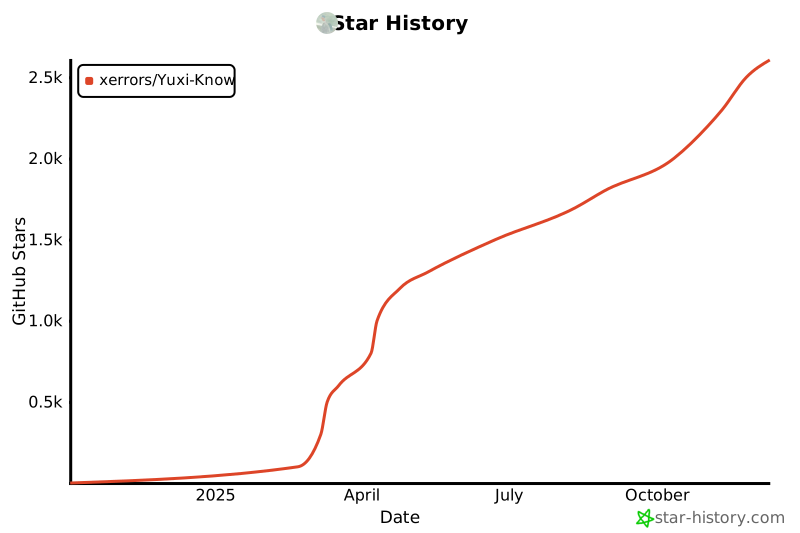](https://star-history.com/#xerrors/Yuxi-Know)
|
