2026-05-11 21:08:02 +08:00
< div align = "center" >
2026-06-03 17:55:10 +08:00
< h1 > Yuxi< / h1 >
< p > < strong > A multi-tenant agent platform combining RAG and knowledge graphs< / strong > < br / > Make enterprise knowledge retrievable, reasoned over, and deliverable by agents< / p >
2026-05-11 21:08:02 +08:00
[](https://github.com/xerrors/Yuxi/blob/main/docker-compose.yml)
[](https://github.com/xerrors/Yuxi/issues)
[](https://github.com/xerrors/Yuxi/blob/main/LICENSE)
[](https://deepwiki.com/xerrors/Yuxi)
[](https://zread.ai/xerrors/Yuxi)
[](https://www.bilibili.com/video/BV1DF14BTETq/)
< a href = "https://trendshift.io/repositories/24335" target = "_blank" > < img src = "https://trendshift.io/api/badge/repositories/24335" alt = "xerrors%2FYuxi | Trendshift" style = "width: 250px; height: 55px;" width = "250" height = "55" / > < / a >
[[Docs]](https://xerrors.github.io/Yuxi) · [[中文]](README.md)
< / div >
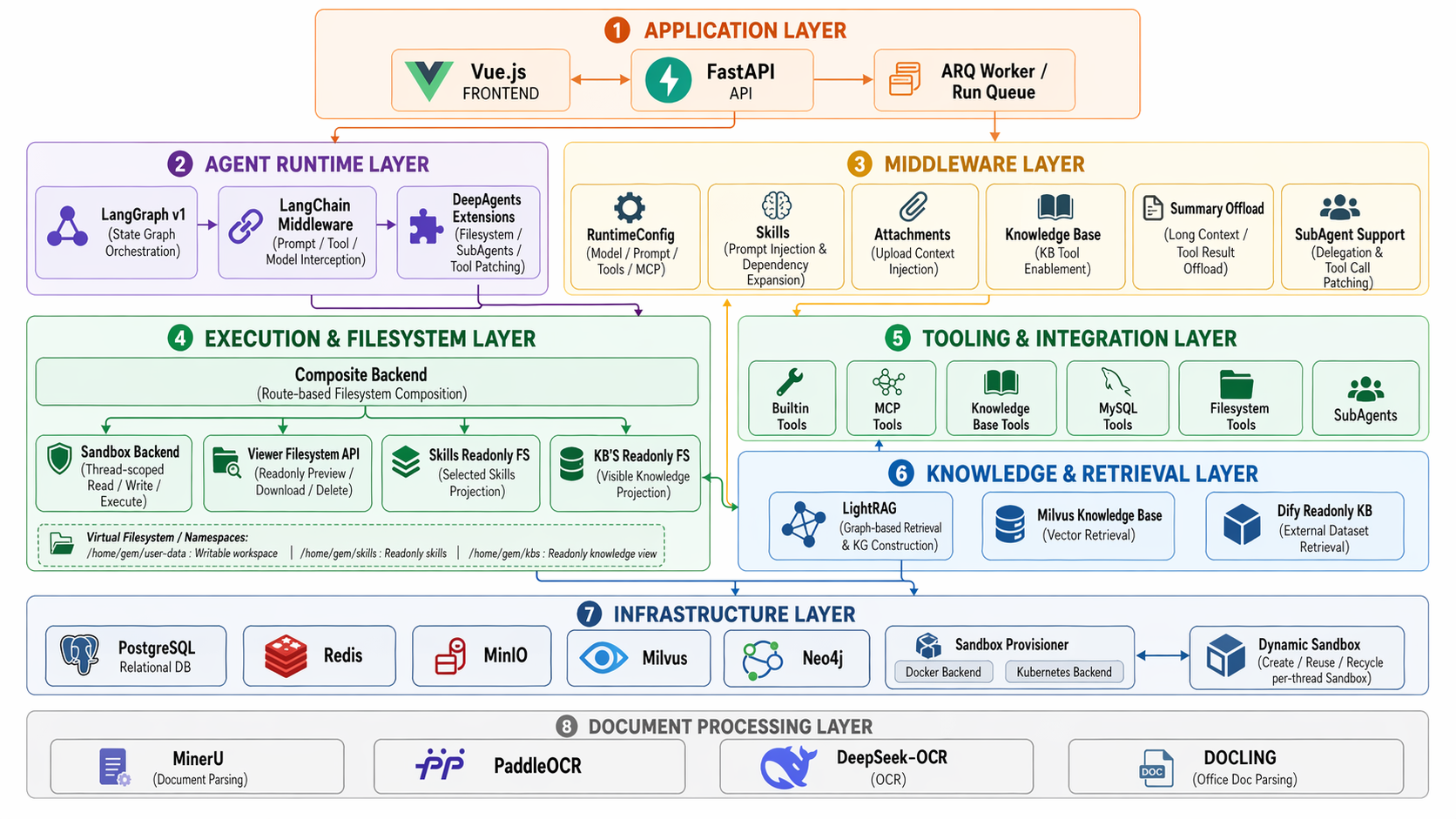
**Image generated by GPT-Image-2.*
2026-06-03 17:55:10 +08:00
## Introduction
Yuxi is an LLM-powered platform for building knowledge-base and knowledge-graph agents. It unifies **RAG retrieval** , **LightRAG knowledge graphs** , and **LangGraph multi-agent orchestration** into a single multi-tenant workspace: administrators configure knowledge bases, models, and permissions, while users chat — in a ChatGPT-like interface — with agents that can mount Skills, MCPs, sub-agents, and sandbox tools, and receive answers with cited sources, graph-based reasoning, and deliverable artifacts.
2026-05-11 21:08:02 +08:00
## Core Features
2026-06-03 17:55:10 +08:00
- 🤖 **Agent development** — Built on LangGraph, with sub-agents (SubAgents), Skills, MCPs, Tools, and middleware; long-running tasks run asynchronously on a background worker, backed by a sandbox file system for persisting, previewing, and downloading tool artifacts.
- 📚 **Knowledge base (RAG)** — Multi-format document parsing (MinerU / PaddleX / OCR), configurable Embedding and Rerank models, knowledge base evaluation, in-app PDF / image preview, and retrieval sources backfilled as chat citations.
- 🕸️ **Knowledge graph** — Graph construction and visualization based on LightRAG, with property graph support that feeds directly into agent reasoning.
- 🏢 **Multi-tenancy & permissions** — User / department-level access control, unified model provider configuration, and API Key authentication for external system integration.
- ⚙️ **Platform & engineering** — Vue + FastAPI architecture, ready-to-run Docker Compose deployment, dark mode, a lightweight LITE startup mode, and production-grade orchestration.
## Tech Stack
| Layer | Technologies |
| --- | --- |
| Frontend | Vue 3 · Vite · Pinia |
| Backend | FastAPI · LangGraph · ARQ (async worker) |
| Storage | PostgreSQL · Redis · MinIO · Milvus · Neo4j |
| Doc parsing | MinerU · PaddleX · RapidOCR |
| Deployment | Docker Compose |
2026-05-11 21:08:02 +08:00
## Quick Start
2026-06-03 17:55:10 +08:00
**Prerequisites**: [Docker ](https://docs.docker.com/get-docker/ ) and Docker Compose installed, plus at least one OpenAI-compatible LLM API.
**1. Clone and initialize**
2026-05-11 21:08:02 +08:00
```bash
2026-06-03 17:55:10 +08:00
git clone --branch v0.7.0.dev0 --depth 1 https://github.com/xerrors/Yuxi.git
2026-05-11 21:08:02 +08:00
cd Yuxi
# Linux/macOS
./scripts/init.sh
# Windows PowerShell
.\scripts\init.ps1
```
2026-06-03 17:55:10 +08:00
**2. Start with Docker**
2026-05-11 21:08:02 +08:00
```bash
docker compose up --build
```
2026-06-03 17:55:10 +08:00
**3. Open the platform**
Once the services are ready, open `http://localhost:5173` in your browser and sign in with the admin account generated during initialization.
> 💡 If you don't need heavy dependencies like knowledge bases / graphs, run `make up-lite` for a lightweight LITE mode with faster cold starts. See the [docs](https://xerrors.github.io/Yuxi) for more deployment details.
2026-05-11 21:08:02 +08:00
## Examples and Demo
< table >
< tr >
< td align = "center" >
< img src = "https://xerrors.oss-cn-shanghai.aliyuncs.com/github/image-20260326125852369.png" width = "100%" alt = "Home" / >
< br / >
< strong > Home< / strong >
< / td >
< td align = "center" >
< img src = "https://github.com/user-attachments/assets/d3e4fe09-fa48-4686-93ea-2c50300ade21" width = "100%" alt = "Dashboard statistics" / >
< br / >
< strong > Dashboard Statistics< / strong >
< / td >
< / tr >
< tr >
< td align = "center" >
< img src = "https://xerrors.oss-cn-shanghai.aliyuncs.com/github/image-20260326130528866.png" width = "100%" alt = "Agent configuration" / >
< br / >
< strong > Agent Configuration< / strong >
< / td >
< td align = "center" >
< img src = "https://github.com/user-attachments/assets/06d56525-69bf-463a-8360-286b2cf8796f" width = "100%" alt = "Knowledge base invocation" / >
< br / >
< strong > Knowledge Base Invocation< / strong >
< / td >
< / tr >
< tr >
< td align = "center" >
< img src = "https://github.com/user-attachments/assets/0548d89c-15a3-47cf-ba87-1b544f7dd749" width = "100%" alt = "Create knowledge base" / >
< br / >
< strong > Create Knowledge Base< / strong >
< / td >
< td align = "center" >
< img src = "https://github.com/user-attachments/assets/21396d04-376b-4e9a-8139-eec8c3cc915a" width = "100%" alt = "Knowledge base management" / >
< br / >
< strong > Knowledge Base Management< / strong >
< / td >
< / tr >
< tr >
< td align = "center" >
< img src = "https://github.com/user-attachments/assets/fc46a14b-16fb-47ea-84a0-148a451f3012" width = "100%" alt = "Knowledge graph" / >
< br / >
< strong > Knowledge Graph Visualization< / strong >
< / td >
< td align = "center" >
< img src = "https://github.com/user-attachments/assets/d8b3de51-2854-455b-956f-2ae2d8d5f677" width = "100%" alt = "Project docs" / >
< br / >
< strong > Project Documentation< / strong >
< / td >
< / tr >
< tr >
< td align = "center" >
< img src = "https://xerrors.oss-cn-shanghai.aliyuncs.com/github/image-20260326130404306.png" width = "100%" alt = "Skills management" / >
< br / >
< strong > Extension Management (Skills)< / strong >
< / td >
< td align = "center" >
< img src = "https://github.com/user-attachments/assets/9305d7a4-663b-4e5d-a252-211d6caa019b" width = "100%" alt = "MCPs management" / >
< br / >
< strong > Extension Management (MCPs)< / strong >
< / td >
< / tr >
< tr >
< td align = "center" >
< img src = "https://github.com/user-attachments/assets/13bd22ea-ddde-4262-8c29-69fb948bce44" width = "100%" alt = "User and department permissions" / >
< br / >
< strong > User / Department Permission Management< / strong >
< / td >
< td align = "center" >
< img src = "https://github.com/user-attachments/assets/cc886b04-719e-4abd-807d-e9955080003d" width = "100%" alt = "Model provider configuration" / >
< br / >
< strong > Model Provider Configuration< / strong >
< / td >
< / tr >
< / table >
## Acknowledgements
Yuxi references and builds on the following excellent open-source projects:
- [LightRAG ](https://github.com/HKUDS/LightRAG ) - Used as the foundation for graph construction and retrieval.
- [DeepAgents ](https://github.com/langchain-ai/deepagents ) - Used as the deep agent framework.
- [DeerFlow ](https://github.com/bytedance/deer-flow ) - Referenced for Sandbox agent architecture ideas.
- [RAGflow ](https://github.com/infiniflow/ragflow ) - Referenced for document text chunking strategies.
- [LangGraph ](https://github.com/langchain-ai/langgraph ) - Multi-agent orchestration framework and the core architectural foundation of this project.
- [QwenPaw ](https://github.com/agentscope-ai/QwenPaw ) - Referenced for model configuration and personal file area design.
## Contributing
Thanks to all contributors for supporting this project!
< a href = "https://github.com/xerrors/Yuxi/contributors" >
< img src = "https://contrib.rocks/image?repo=xerrors/Yuxi&max=100&columns=10" / >
< / a >
## Star History
[](https://star-history.com/#xerrors/Yuxi)
## 📄 License
This project is licensed under the MIT License. See [LICENSE ](LICENSE ) for details.
---
< div align = "center" >
**If this project helps you, please give us a ⭐️.**
< / div >
