语析 - 基于大模型的知识库与知识图谱问答系统


## 📖 简介
语析是一个功能强大的智能问答平台,融合了 RAG 知识库与知识图谱技术,基于 LangGraph + Vue.js + FastAPI + LightRAG 架构构建。
### ✨ 核心特性
- 🤖 **多模型支持** - 兼容 OpenAI、国内主流大模型平台及本地部署(vLLM、Ollama)
- 📚 **灵活知识库** - 支持 PDF、TXT、MD、Docx 等格式,支持 URL 导入和联网搜索
- 🤖 **智能体扩展** - 支持自定义智能体开发,兼容 LangGraph 部署
- 🕸️ **知识图谱** - 基于 Neo4j 的图谱问答,可接入现有知识图谱
- 👥 **权限控制** - 支持超级管理员、管理员、普通用户三级权限体系

https://github.com/user-attachments/assets/15f7f315-003d-4e41-a260-739c2529f824
## 🚀 快速开始
### 系统要求
- Docker 和 Docker Compose
- 2GB+ 可用内存
- (可选)CUDA 支持的 GPU(用于 OCR 服务)
### 一键启动
1. **克隆项目**
```bash
git clone -b stable https://github.com/xerrors/Yuxi-Know.git
cd Yuxi-Know
```
2. **配置 API 密钥**
复制环境变量模板并编辑:
```bash
cp src/.env.template src/.env
```
**必需配置**(推荐使用硅基流动免费服务):
```env
SILICONFLOW_API_KEY=sk-270ea********8bfa97.e3XOMd****Q1Sk
```
> 💡 [免费获取 SiliconFlow API Key](https://cloud.siliconflow.cn/i/Eo5yTHGJ)(注册即送 14 元额度)
3. **启动服务**
```bash
docker compose up --build
```
添加 `-d` 参数可后台运行。启动完成后访问:[http://localhost:5173](http://localhost:5173)
4. **停止服务**
```bash
docker compose down
```
### 故障排除
- **内存不足**:如果 Milvus 启动失败,执行 `docker compose up milvus -d && docker restart api-dev`
- **查看日志**:`docker logs api-dev -f`
## 📋 更新日志
- **2025.05.07** - 新增三级权限控制系统 [PR#173](https://github.com/xerrors/Yuxi-Know/pull/173)
- **2025.03.30** - 智能体功能集成 [PR#96](https://github.com/xerrors/Yuxi-Know/pull/96)
- **2025.02.24** - 新增网页检索功能,支持实时信息获取
- **2025.02.23** - SiliconFlow Rerank 和 Embedding 模型支持
- **2025.02.20** - DeepSeek-R1 模型支持
## 🤖 模型配置
### 对话模型
支持多种 API 服务商,配置对应的 `API_KEY` 即可使用:
| 服务商 | 推荐模型 | 环境变量 | 备注 |
|--------|---------|----------|------|
| 硅基流动 | `Qwen2.5-7B-Instruct` | `SILICONFLOW_API_KEY` | 🆓 免费,默认 |
| OpenAI | `gpt-4o` | `OPENAI_API_KEY` | |
| DeepSeek | `deepseek-chat` | `DEEPSEEK_API_KEY` | |
| 豆包方舟 | `doubao-pro` | `ARK_API_KEY` | |
| 智谱清言 | `glm-4-flash` | `ZHIPUAI_API_KEY` | |
| 阿里云 | `qwen-max-latest` | `DASHSCOPE_API_KEY` | |
**完整配置示例:**
```env
# 基础配置(必需)
SILICONFLOW_API_KEY=sk-your-key-here
# 可选配置
OPENAI_API_KEY=sk-your-openai-key
DEEPSEEK_API_KEY=sk-your-deepseek-key
TAVILY_API_KEY=your-tavily-key # 联网搜索功能
```
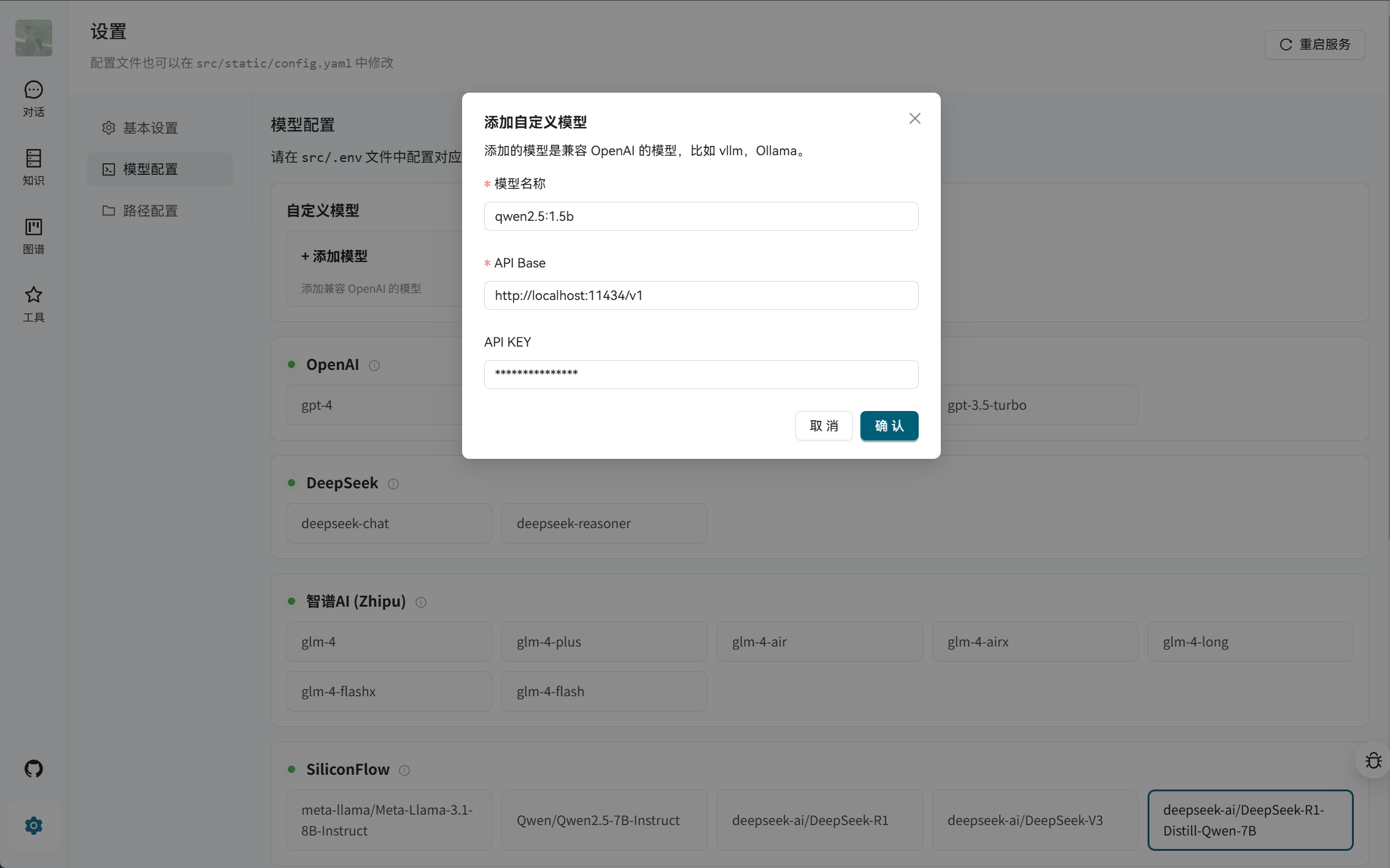
### 本地模型部署
支持通过 vLLM 或 Ollama 部署本地模型:
然后在 Web 界面的"设置"中添加本地模型地址。
## 📚 功能详解
### 知识库管理
- **多格式支持**:PDF、TXT、Markdown、Docx、Excel 等
- **多种导入方式**:本地上传、URL 导入、批量导入
- **智能分块**:自动优化文档分割策略
- **向量检索**:基于 Milvus 的高效相似度搜索
### 知识图谱
使用 Neo4j 构建知识图谱问答能力:
1. **数据格式**:支持 JSONL 格式导入
```jsonl
{"h": "北京", "t": "中国", "r": "首都"}
{"h": "上海", "t": "中国", "r": "直辖市"}
```
2. **图谱访问**:
- Web 界面:[http://localhost:7474](http://localhost:7474)
- 默认账户:`neo4j` / `0123456789`
3. **现有图谱接入**:修改 `docker-compose.yml` 中的 `NEO4J_URI` 配置
### 高级功能
- **联网搜索**:配置 `TAVILY_API_KEY` 获取实时信息
- **智能体开发**:支持自定义智能体逻辑
- **权限管理**:三级用户权限体系
- **OCR 增强**:可选 MinerU 或 PP-Structure-V3 服务
## 🔧 高级配置
### OCR 服务(可选)
提升 PDF 解析准确性,需要 GPU 支持:
```bash
# MinerU(需要 CUDA 12.4+)
docker compose up mineru --build
# PP-Structure-V3(需要 CUDA 11.8+)
docker compose up paddlex --build
```
### 服务端口说明
| 端口 | 服务 | 说明 |
|------|------|------|
| 5173 | Web 前端 | 用户界面 |
| 5050 | API 后端 | 核心服务 |
| 7474/7687 | Neo4j | 图数据库 |
| 9000/9001 | MinIO | 对象存储 |
| 19530/9091 | Milvus | 向量数据库 |
| 30000 | MinerU | PDF 解析(可选)|
| 8080 | PaddleX | OCR 服务(可选)|
| 8081 | vLLM | 本地推理(可选)|
### 自定义模型供应商
在 [src/static/models.yaml](src/static/models.yaml) 中添加新的模型配置:
```yaml
your_provider:
name: "自定义供应商"
default: "your-model-name"
base_url: "https://api.your-provider.com/v1"
env:
- YOUR_API_KEY
models:
- your-model-name
```
## ❓ 常见问题
### 安装和部署
**Q: 如何优雅拉取镜像?**
```bash
bash docker/pull_image.sh python:3.12
```
## 🤝 参与贡献
感谢所有贡献者的支持!
 ### 如何贡献
1. Fork 本项目
2. 创建特性分支 (`git checkout -b feature/amazing-feature`)
3. 提交更改 (`git commit -m 'Add some amazing feature'`)
4. 推送到分支 (`git push origin feature/amazing-feature`)
5. 创建 Pull Request
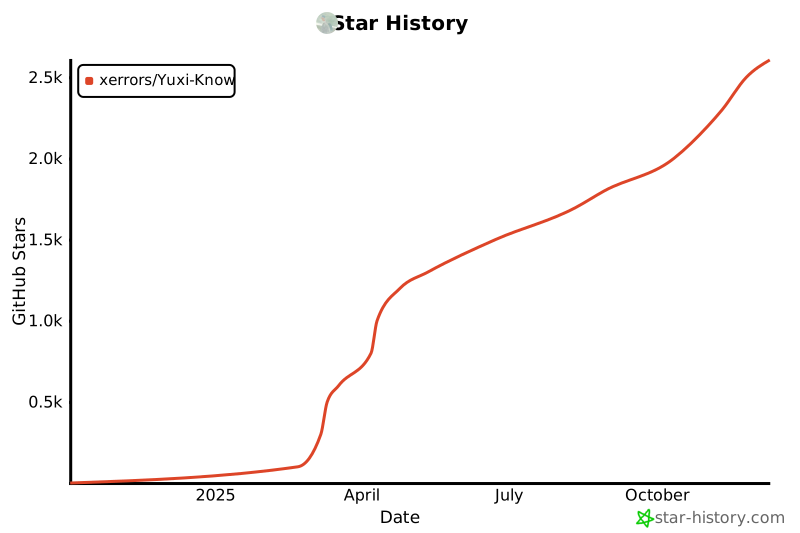
## 📊 Star History
[](https://star-history.com/#xerrors/Yuxi-Know)
## 📄 许可证
本项目采用 MIT 许可证 - 查看 [LICENSE](LICENSE) 文件了解详情。
---
### 如何贡献
1. Fork 本项目
2. 创建特性分支 (`git checkout -b feature/amazing-feature`)
3. 提交更改 (`git commit -m 'Add some amazing feature'`)
4. 推送到分支 (`git push origin feature/amazing-feature`)
5. 创建 Pull Request
## 📊 Star History
[](https://star-history.com/#xerrors/Yuxi-Know)
## 📄 许可证
本项目采用 MIT 许可证 - 查看 [LICENSE](LICENSE) 文件了解详情。
---
**如果这个项目对您有帮助,请不要忘记给我们一个 ⭐️**
[报告问题](https://github.com/xerrors/Yuxi-Know/issues) | [功能请求](https://github.com/xerrors/Yuxi-Know/issues) | [讨论](https://github.com/xerrors/Yuxi-Know/discussions)