
263 lines
13 KiB
Markdown
263 lines
13 KiB
Markdown
<div align="center">
|
||
<h1>语析 Yuxi</h1>
|
||
|
||
<p><strong>融合 RAG 与知识图谱的多租户智能体平台</strong><br/>让企业知识可被智能体检索、推理与交付</p>
|
||
|
||
[](https://github.com/xerrors/Yuxi/blob/main/docker-compose.yml)
|
||
[](https://github.com/xerrors/Yuxi/issues)
|
||
[](https://github.com/xerrors/Yuxi/blob/main/LICENSE)
|
||
[](https://deepwiki.com/xerrors/Yuxi)
|
||
[](https://zread.ai/xerrors/Yuxi)
|
||
[](https://www.bilibili.com/video/BV1DF14BTETq/)
|
||
|
||
|
||
<a href="https://trendshift.io/repositories/24335" target="_blank"><img src="https://trendshift.io/api/badge/repositories/24335" alt="xerrors%2FYuxi | Trendshift" style="width: 250px; height: 55px;" width="250" height="55"/></a>
|
||
|
||
[[文档]](https://xerrors.github.io/Yuxi) · [[English]](README.en.md)
|
||
|
||
</div>
|
||
|
||
|
||
|
||
|
||
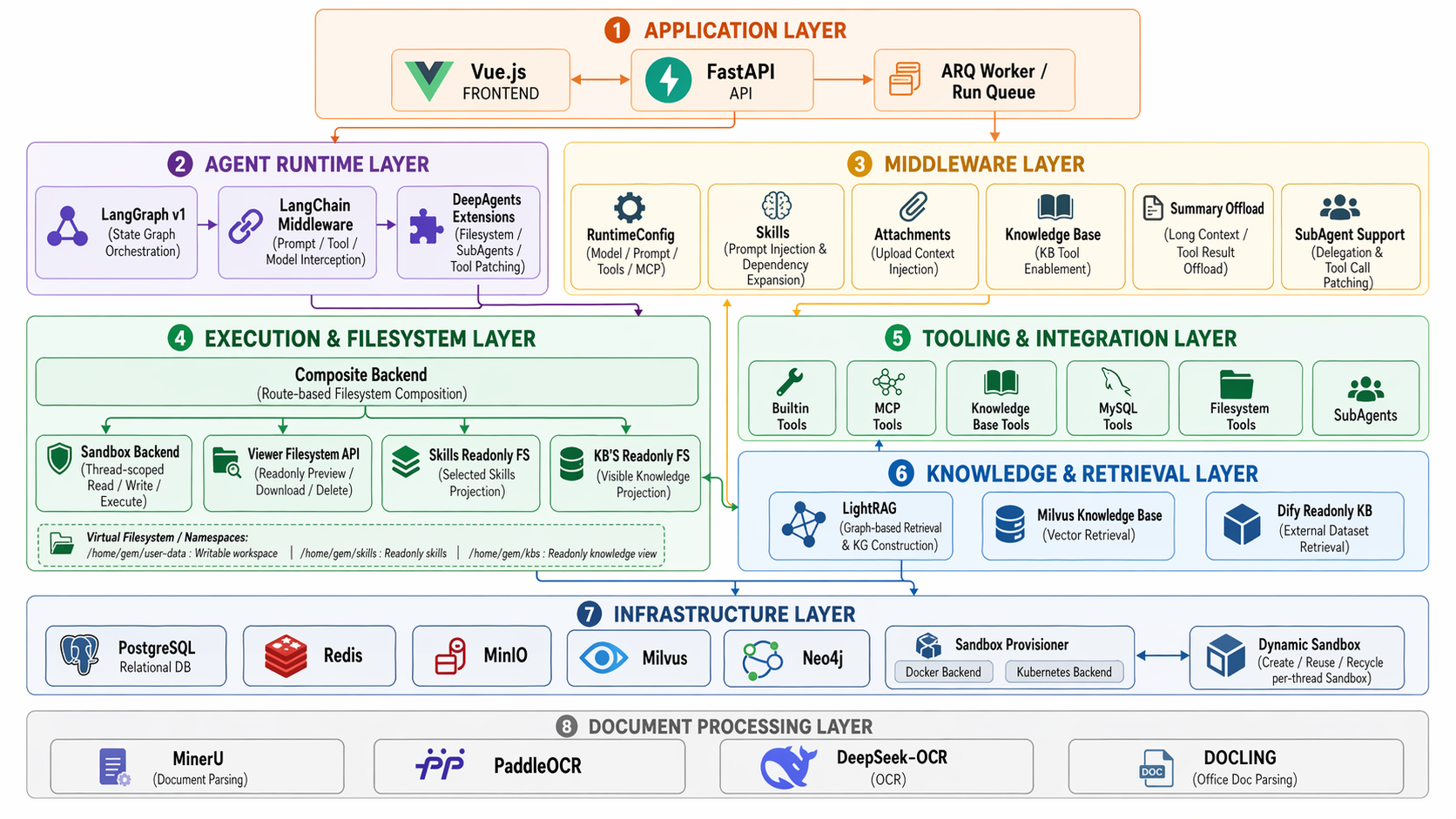
**图由 GPT-Image-2 生成*
|
||
|
||
## 简介
|
||
|
||
语析(Yuxi)是一个基于大模型的智能知识库与知识图谱智能体开发平台。它把 **RAG 检索**、**Milvus 知识库内知识图谱** 与 **LangGraph 多智能体编排** 整合进统一的多租户工作台:管理员配置知识库、模型与权限,用户在类 ChatGPT 的界面中与可挂载 Skills、MCP、子智能体和沙盒工具的智能体对话,并获得带引用来源、知识图谱推理与可交付产物的回答。
|
||
|
||
## 核心特性
|
||
|
||
- 🤖 **智能体开发** —— 基于 LangGraph 构建,支持子智能体(SubAgents)、Skills、MCP、Tools 与中间件机制;长耗时任务由后台 worker 异步执行,配套沙盒文件系统支持工具产物落盘、预览与下载。
|
||
- 📚 **知识库(RAG)** —— 多格式文档解析(MinerU / PaddleX / OCR),可配置 Embedding 与 Rerank 模型,支持知识库评估与 PDF / 图片在线预览,检索来源回填到对话引用。
|
||
- 🕸️ **知识图谱** —— 在 Milvus 知识库内构建、展示和检索实体关系图谱,并与 chunk 检索结果融合参与智能体推理。
|
||
- 🏢 **多租户与权限** —— 用户 / 部门级权限管理,模型供应商统一配置,支持 API Key 认证供外部系统集成调用。
|
||
- ⚙️ **平台与工程化** —— Vue + FastAPI 架构,开箱即用的 Docker Compose 部署,支持暗黑模式、LITE 轻量启动与生产级编排。
|
||
|
||
## 技术栈
|
||
|
||
| 层 | 技术 |
|
||
| --- | --- |
|
||
| 前端 | Vue 3 · Vite · Pinia |
|
||
| 后端 | FastAPI · LangGraph · ARQ (异步 worker) |
|
||
| 存储 | PostgreSQL · Redis · MinIO · Milvus · Neo4j |
|
||
| 文档解析 | MinerU · PaddleX · RapidOCR |
|
||
| 部署 | Docker Compose |
|
||
|
||
## 最新动态
|
||
|
||
|
||
<details open>
|
||
<summary>[2026/06] v0.7.0 开发中(重要不兼容变更)</summary>
|
||
|
||
### 重大变更
|
||
|
||
- **模型配置收敛**:移除旧版 v1 模型配置与 Ollama 支持,运行时统一使用 `provider_id:model_id` 与独立 provider 模块,自定义 provider 迁移到数据库
|
||
- **智能体运行时收敛**:用户可见的 `AgentConfig` 收敛为数据库持久化的一级 `Agent`,新增 `/api/agent` 管理与运行接口,前端只提交 `agent_id`
|
||
- **知识库能力收敛**:移除 Upload 与 LightRAG 知识库/图谱能力,知识库类型收敛为 **Milvus** 与只读连接器(**Dify**、**Notion**);知识图谱仅保留 Milvus 知识库内的构建/展示/检索
|
||
- **Skill 安装与权限收敛**:以 `source_type / share_config / enabled` 表达来源、生效范围与启用状态;内置 Skill 启动自动入库并默认全局启用,上传/远程统一改为「解析草稿 → 确认安装」
|
||
- **用户身份命名收敛**:业务登录标识统一为字符串 `uid`
|
||
|
||
详见 [开发路线图](docs/develop-guides/roadmap.md)。
|
||
|
||
</details>
|
||
|
||
<details>
|
||
<summary>[2026/04/01] v0.6.0 版本发布</summary>
|
||
|
||
### 新增
|
||
|
||
- 重构后端代码 src -> backend/package/yuxi
|
||
- 重构文档解析,统一文档解析体验,并新增 Parser 类
|
||
- 新增 LITE 模式启动,启动时不加载知识库、知识图谱相关模块,可以使用 make up-lite 快捷启动
|
||
- 新增沙盒环境,详见后续文档更新,统一沙盒虚拟路径前缀默认值为 `/home/gem/user-data`
|
||
- 新增基于沙盒的文件系统,前端工作台可以查看文件系统,支持预览(文本、图片、PDF、HTML)、下载文件
|
||
- 新增 `present_artifacts` 内置工具:Agent 可将 `/home/gem/user-data/outputs/` 下的结果文件显式写入 LangGraph state 的 `artifacts` 字段,前端支持在输入框顶部以默认折叠的堆叠卡片展示本轮交付物文件,并保持可下载、可预览能力
|
||
- 新增基于沙盒的知识库只读映射,按“用户可访问知识库 ∩ 当前 Agent 已启用知识库”暴露原始文件与解析后的 Markdown
|
||
- 重构附件系统,直接集成在了沙盒文件系统中,附件上传后直接落盘到沙盒挂载目录
|
||
- 优化前端流式消息体验:新增通用 `useStreamSmoother` 调度层,统一平滑 Agent runs SSE、普通聊天流与审批恢复流中的 `loading` chunk
|
||
- 优化项目文档说明,并添加贡献指南
|
||
- 重构前端 Agent 路由结构,体验更加顺畅,切换更加自然(类 chatgpt 体验)
|
||
- 新增 API Key 认证功能,支持外部系统通过 API Key 调用系统服务
|
||
- 新增 subagents 的支持,支持在 web 中添加 subagents,以及两个内置的子智能体
|
||
- 新增内置Skills reporter,并移除内置 Agent reporter,数据库报表将由 Skills 完成
|
||
- 新增内置 Skills `deep-reporter`,用于指导生成科研报告、行业调研和其他深度分析类长报告
|
||
- 重构内置 Skills/MCP/Subagents 安装/添加/移除机制:内置 skill 支持按需安装、基于 `version + content_hash` 的更新提示与覆盖确认,不再使用服务器级开关切换
|
||
- 新增知识库 PDF、图片的预览功能
|
||
- 重构后端测试目录结构:按 `unit / integration / e2e` 分层迁移现有测试,拆分全局 `conftest.py`,统一测试入口为 `uv run --group test pytest`,并新增独立测试规范文档 `docs/develop-guides/testing-guidelines.md`
|
||
|
||
|
||
### 修复
|
||
|
||
- 修复 Lightrag 知识库修改配置后,模型没有切换的 bug [#580](https://github.com/xerrors/Yuxi/issues/580)
|
||
- 修复数据库获取接口未过滤文件字段而导致的数据包过大的情况
|
||
- 修复 Thread 未绑定 agent_config_id 导致的历史对话切换后上下文配置错乱的问题
|
||
|
||
|
||
</details>
|
||
|
||
<details>
|
||
<summary>[2026/03/01] v0.5.0 版本发布</summary>
|
||
|
||
详见 [changelog](docs/develop-guides/changelog.md)
|
||
|
||
</details>
|
||
|
||
<details>
|
||
<summary>[2025/12/19] v0.4.0 版本发布</summary>
|
||
|
||
详见 [changelog](docs/develop-guides/changelog.md)
|
||
|
||
</details>
|
||
|
||
<details>
|
||
<summary>[2025/11/05] v0.3.0 版本发布</summary>
|
||
|
||
详见 [changelog](docs/develop-guides/changelog.md)
|
||
|
||
</details>
|
||
|
||
## 快速开始
|
||
|
||
**前置要求**:已安装 [Docker](https://docs.docker.com/get-docker/) 与 Docker Compose,并准备至少一个兼容 OpenAI 接口的大模型 API。
|
||
|
||
**1. 克隆代码并初始化**
|
||
|
||
```bash
|
||
git clone --branch v0.7.0.dev1 --depth 1 https://github.com/xerrors/Yuxi.git
|
||
cd Yuxi
|
||
|
||
# Linux/macOS
|
||
./scripts/init.sh
|
||
|
||
# Windows PowerShell
|
||
.\scripts\init.ps1
|
||
```
|
||
|
||
**2. 使用 Docker 启动**
|
||
|
||
```bash
|
||
docker compose up --build
|
||
```
|
||
|
||
**3. 访问平台**
|
||
|
||
等待启动完成后,浏览器打开 `http://localhost:5173`,使用初始化时生成的管理员账户登录即可。
|
||
|
||
> 💡 不需要知识库 / 知识图谱等重依赖时,可使用 `make up-lite` 以 LITE 轻量模式启动,加快冷启动速度。更多部署说明见 [项目文档](https://xerrors.github.io/Yuxi)。
|
||
|
||
## 示例与演示
|
||
|
||
<table>
|
||
<tr>
|
||
<td align="center">
|
||
<img src="https://xerrors.oss-cn-shanghai.aliyuncs.com/github/image-20260326125852369.png" width="100%" alt="首页"/>
|
||
<br/>
|
||
<strong>首页</strong>
|
||
</td>
|
||
<td align="center">
|
||
<img src="https://github.com/user-attachments/assets/d3e4fe09-fa48-4686-93ea-2c50300ade21" width="100%" alt="Dashboard 统计"/>
|
||
<br/>
|
||
<strong>Dashboard 统计</strong>
|
||
</td>
|
||
</tr>
|
||
<tr>
|
||
<td align="center">
|
||
<img src="https://xerrors.oss-cn-shanghai.aliyuncs.com/github/image-20260326130528866.png" width="100%" alt="智能体配置"/>
|
||
<br/>
|
||
<strong>智能体配置</strong>
|
||
</td>
|
||
<td align="center">
|
||
<img src="https://github.com/user-attachments/assets/06d56525-69bf-463a-8360-286b2cf8796f" width="100%" alt="知识库调用"/>
|
||
<br/>
|
||
<strong>知识库调用</strong>
|
||
</td>
|
||
</tr>
|
||
<tr>
|
||
<td align="center">
|
||
<img src="https://github.com/user-attachments/assets/0548d89c-15a3-47cf-ba87-1b544f7dd749" width="100%" alt="新建知识库"/>
|
||
<br/>
|
||
<strong>新建知识库</strong>
|
||
</td>
|
||
<td align="center">
|
||
<img src="https://github.com/user-attachments/assets/21396d04-376b-4e9a-8139-eec8c3cc915a" width="100%" alt="知识库管理"/>
|
||
<br/>
|
||
<strong>知识库管理</strong>
|
||
</td>
|
||
</tr>
|
||
<tr>
|
||
<td align="center">
|
||
<img src="https://github.com/user-attachments/assets/fc46a14b-16fb-47ea-84a0-148a451f3012" width="100%" alt="知识图谱"/>
|
||
<br/>
|
||
<strong>知识图谱可视化</strong>
|
||
</td>
|
||
<td align="center">
|
||
<img src="https://github.com/user-attachments/assets/d8b3de51-2854-455b-956f-2ae2d8d5f677" width="100%" alt="项目文档"/>
|
||
<br/>
|
||
<strong>项目使用文档</strong>
|
||
</td>
|
||
</tr>
|
||
<tr>
|
||
<td align="center">
|
||
<img src="https://xerrors.oss-cn-shanghai.aliyuncs.com/github/image-20260326130404306.png" width="100%" alt="拓展管理"/>
|
||
<br/>
|
||
<strong>拓展管理(Skills)</strong>
|
||
</td>
|
||
<td align="center">
|
||
<img src="https://github.com/user-attachments/assets/9305d7a4-663b-4e5d-a252-211d6caa019b" width="100%" alt="拓展管理(MCPs)"/>
|
||
<br/>
|
||
<strong>拓展管理(MCPs)</strong>
|
||
</td>
|
||
</tr>
|
||
<tr>
|
||
<td align="center">
|
||
<img src="https://github.com/user-attachments/assets/13bd22ea-ddde-4262-8c29-69fb948bce44" width="100%" alt="拓展管理(Skills)"/>
|
||
<br/>
|
||
<strong>用户/部门权限管理</strong>
|
||
</td>
|
||
<td align="center">
|
||
<img src="https://github.com/user-attachments/assets/cc886b04-719e-4abd-807d-e9955080003d" width="100%" alt="拓展管理(MCPs)"/>
|
||
<br/>
|
||
<strong>模型供应商配置</strong>
|
||
</td>
|
||
</tr>
|
||
</table>
|
||
|
||
|
||
|
||
## 致谢
|
||
|
||
本项目参考并引用了以下优秀开源项目,在此致以诚挚的感谢:
|
||
|
||
- [LightRAG](https://github.com/HKUDS/LightRAG) - 直接引入作为图谱构建与检索的基础包
|
||
- [DeepAgents](https://github.com/langchain-ai/deepagents) - 直接引入作为深度智能体框架
|
||
- [DeerFlow](https://github.com/bytedance/deer-flow) - 参考了其 Sandbox 智能体架构的实现思路
|
||
- [RAGflow](https://github.com/infiniflow/ragflow) - 参考了其文档 Text Chunking 的分块策略
|
||
- [LangGraph](https://github.com/langchain-ai/langgraph) - 多智能体编排框架,本项目的核心架构基础
|
||
- [QwenPaw](https://github.com/agentscope-ai/QwenPaw) - 参考模型配置与个人文件区域设计
|
||
|
||
## 参与贡献
|
||
|
||
感谢所有贡献者的支持!
|
||
|
||
<a href="https://github.com/xerrors/Yuxi/contributors">
|
||
<img src="https://contrib.rocks/image?repo=xerrors/Yuxi&max=100&columns=10" />
|
||
</a>
|
||
|
||
|
||
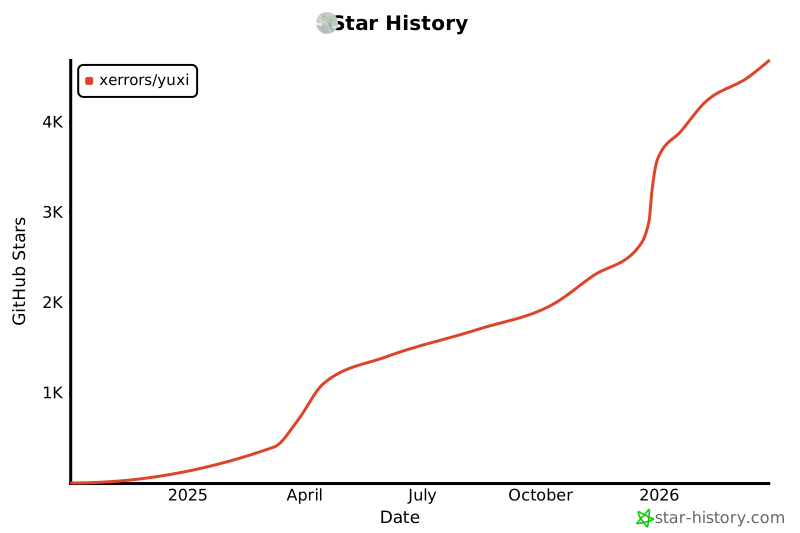
## Star History
|
||
|
||
[](https://star-history.com/#xerrors/Yuxi)
|
||
|
||
## 📄 许可证
|
||
|
||
本项目采用 MIT 许可证 - 查看 [LICENSE](LICENSE) 文件了解详情。
|
||
|
||
---
|
||
|
||
<div align="center">
|
||
|
||
**如果这个项目对您有帮助,请不要忘记给我们一个 ⭐️**
|
||
|
||
</div>
|